Staff and rosters
Weekly rosters, clock in and out, and leave.
Build rosters a week at a time, publish them by email and let staff clock in and out from their phones. Timesheets compare worked hours with rostered hours.
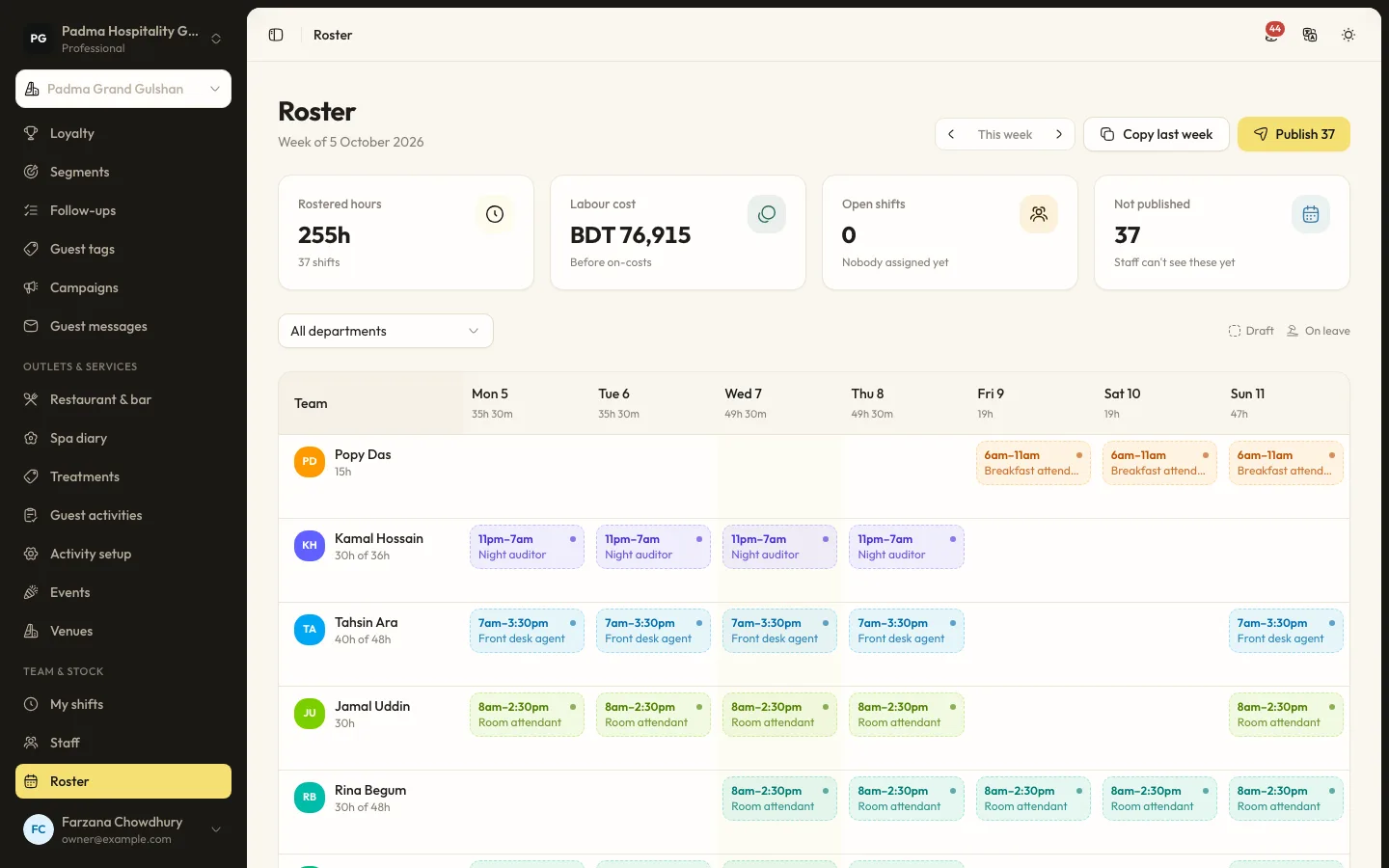
The details that matter at the desk.
- 01
Weekly roster
Rostered hours, labour cost and open shifts by day. Overlapping shifts and shifts on approved leave are refused.
- 02
My shifts
Staff see their published shifts, clock in and out and request leave from a phone.
- 03
Timesheets
Clocked-out entries wait for approval, show worked against rostered hours and export to CSV.
Capabilities
- Staff profiles with or without a login
- Shifts past midnight
- Open shifts
- Copy last week
- Publish rosters by email
- Leave requests and approval
- Pay rates visible only with permission
- Timesheet CSV export
Staff and rosters, answered.
Does it run payroll?
No. It tracks rosters, hours and leave. Export approved timesheets to CSV for your payroll.
What happens to shifts when leave is approved?
That person's shifts on those days become open shifts for someone else to cover.
See it working with your own rooms.
A 30 minute call with someone who has run a front desk. Bring your questions and your room list.